On macOS, I worked with several coding agents side by side in cmux. I wanted the same workflow on my Windows desktop but could not find a suitable tool, so I built a terminal for coding agents around the features I actually use.
As I used it daily, features shaped around my workflow, such as phone remote control, agent-to-agent handoff, and viewer tabs, kept growing. I wanted the same environment on my MacBook, so I added a native macOS build. I now use mast every day on both my Windows desktop at home and my work MacBook, and it has reached v1.0.0.
Key features
- The sidebar shows, for each workspace, whether its agents are running, waiting for input, or finished, along with their latest message. A tab that starts waiting gets a badge and a notification.
- Inside a terminal, an agent uses
mast lsto find the tabs in the same workspace andmast sendto hand work to another pane. Withmast browser, it can also read the browser tab's screen and click or type there. - A phone paired by QR code reads terminal output and sends input to an agent.
- A file explorer, a Markdown viewer and editor, a Git changes viewer, and a built-in browser open as tabs.
- After a restart, the workspace, split, and tab structure and working directories are restored, and Claude Code and Codex continue earlier conversations through their resume commands.
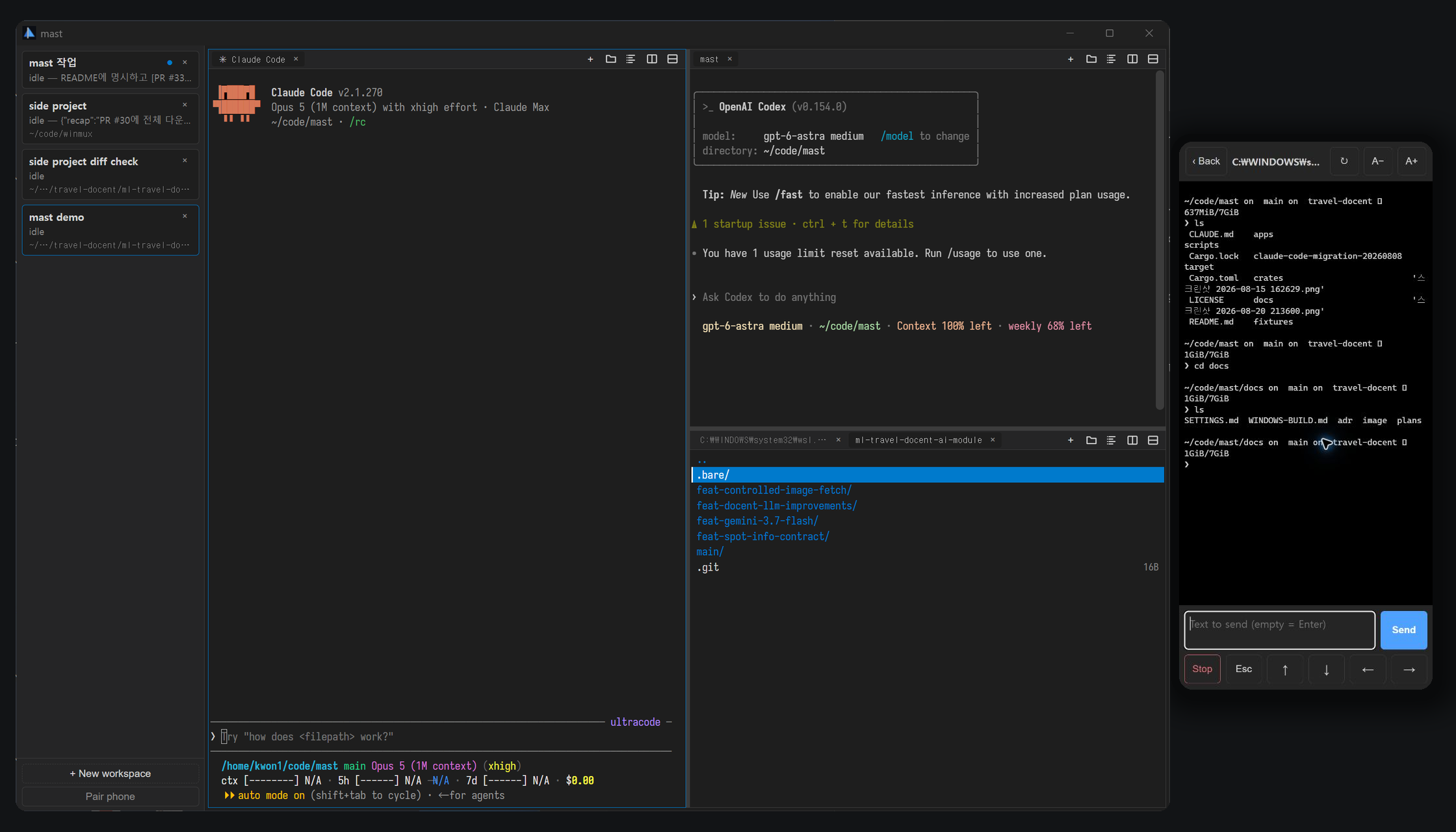
Per-tab agent status tracking
Hooks for Claude Code, Codex, OpenCode, and Antigravity CLI emit OSC 777 tokens (mast:running,
mast:needsInput, and mast:idle) into terminal output, and the Rust OSC scanner separates them
from ordinary output and applies the status to the corresponding tab. Because the existing PTY
stream carries the status, there is no separate daemon or IPC server. Standard notifications such
as OSC 9 change only the unread state and message, so other programs cannot overwrite agent
status.
Status is stored per tab, and the sidebar shows the most urgent tab in each workspace. With several agents in one workspace, the tab waiting for input is easy to find. Status is determined only by each agent's hook signals, not guessed from screen contents or process names, and the app installs the hooks inside WSL on first launch. Terminal output stays a byte stream, and only infrequent events such as state changes go to the UI.
Phone remote connection
The phone needs no app. Scanning the QR code on the desktop opens an HTTPS page hosted on GitHub Pages, and that page connects directly to the PC over WebTransport. The connection stays within the LAN with no cloud relay, and once authenticated, the phone reconnects after a refresh or a screen lock without scanning again. If the Windows Firewall rule is missing, the pairing dialog can add it on the spot. The phone renders the screen with a headless xterm, showing the same content as the desktop.
The PC issues a new self-signed certificate for each pairing and places the certificate's SHA-256
hash and an authentication token in the QR code's URL fragment. Browsers never send the fragment
to the web server, so it never reaches GitHub Pages. The page uses WebTransport's
serverCertificateHashes to accept that one certificate alone, which lets a public HTTPS page
connect to the PC's self-signed certificate. The mechanism limits certificate validity to at most
14 days. The certificate, private key, and token live only in the PC's memory and are discarded
when the app exits.
The listener opens only after the user starts pairing, and only one connection is active at a time. Unauthenticated connections are limited in number and waiting time, and an IP that repeatedly fails authentication is blocked for a while. CI checks the public page bundle for external resource references, plaintext HTTP, and disallowed storage APIs.
UI and terminal lifetime separation
A Rust core independent of any UI framework manages terminal sessions, flow control, OSC parsing, the replay buffer, and layout state. Tauri v2 is a thin layer between the host and the WebView, and vanilla TypeScript and xterm.js render the interface.
A WebView reload used to reclaim memory leaves the PTY session in Rust, and the new UI reattaches to the current state and scrollback. When the app reopens, it launches fresh shells in the saved layout and working directories, and each agent continues its earlier conversation through its own resume command.
Windows and macOS support
On Windows, a terminal always launches as ConPTY → wsl.exe → login shell. My coding agents and
development tools run inside WSL2, so on Windows mast supports WSL2 only. At startup, the app
checks WSL installation and distribution status and, when WSL is not ready, explains the cause and
how to fix it.
The macOS build shares the workspace, pane, and tab model and the terminal replay, OSC handling, and agent-status pipelines with the Windows build. Only the platform-specific parts are separate, and on Apple Silicon macOS it launches zsh or bash directly.
Memory budget
I set a memory ceiling of 150 MB, and on an x64 Windows 11 desktop I measured the whole process tree including WebView2 at about 129 MB. When adding features, I kept unused features from taking up memory.
- Viewer code and the Markdown parser load when first opened.
- Large files are read in 512 KiB chunks, so viewer memory use stays constant regardless of file size.
- A browser tab creates its WebView when first shown, and none at all when the feature is turned off in settings.
Testing and distribution
The Rust core has unit and integration tests, and the TypeScript UI has UI tests. CI runs check
and Clippy for the x64 and ARM64 Windows targets, frontend builds and tests, and an audit of the
phone connection page bundle. A soak test that creates and destroys a ConPTY session 500 times
confirmed that handle and thread counts do not grow. The macOS build is verified with PTY lifetime
tests against real shells and tests for the CLI and settings merging.
On a release tag, Windows runners build x64 and ARM64 portable executables and upload them to GitHub Releases.