On macOS, I worked with several coding agents side by side in cmux. After moving to a Windows desktop, I could not find a lightweight tool that preserved the same workflow. Rather than build a general-purpose terminal emulator, I built a Windows terminal around only the features I actually used. I still use it every day when developing on my Windows 11 desktop at home.
Seeing active and waiting states on one screen
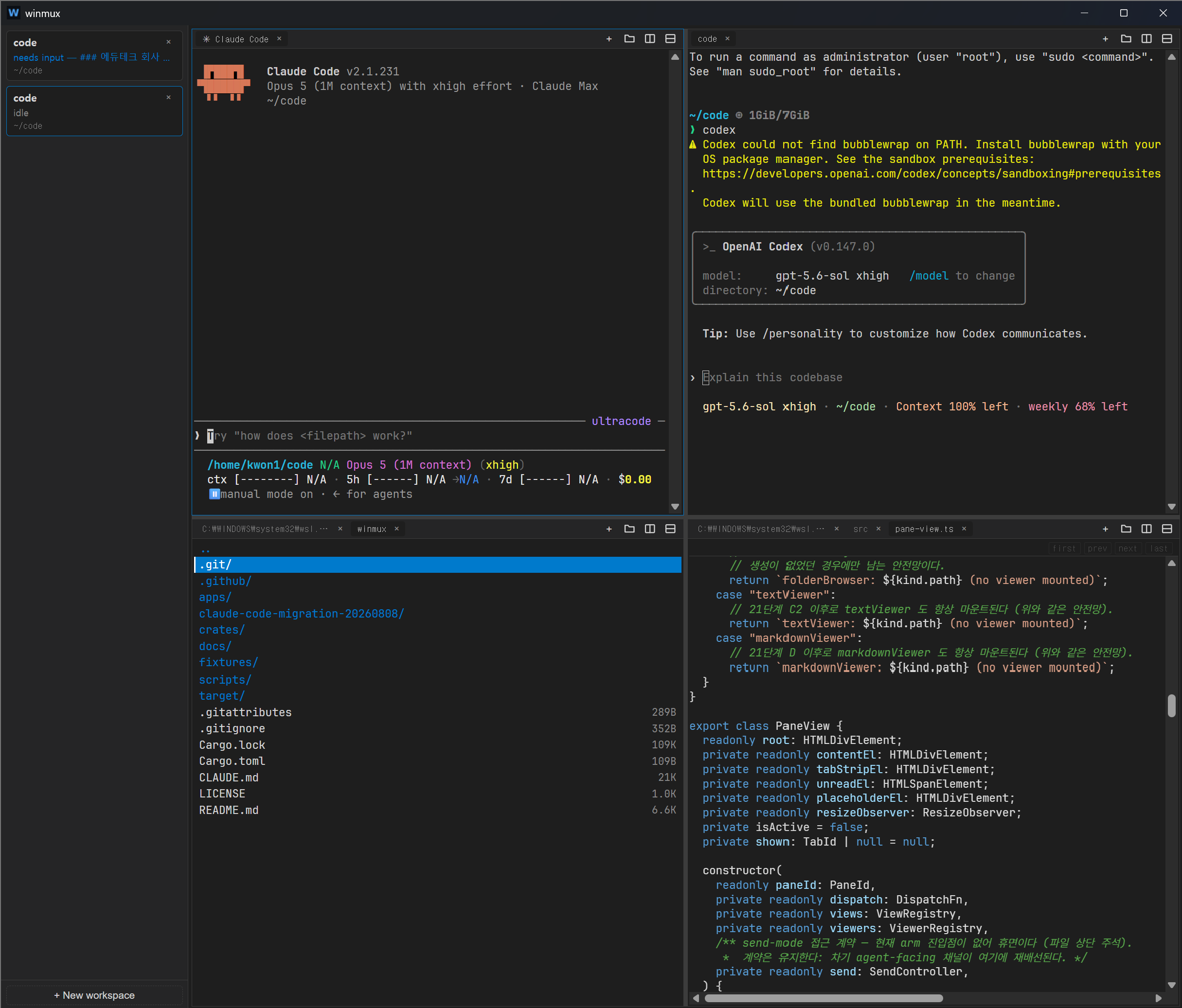
Within a workspace, panes can be split horizontally or vertically, and each pane can contain multiple tabs. A sidebar next to the terminal shows whether the agent in each workspace is running, waiting for input, or finished, together with their latest message. The central benefit is that I do not need to open tabs one by one to check results while several agents run concurrently.
The file explorer and text and Markdown viewers also open as tabs. They let me read documents and output files in the same window while an agent works. Large files are loaded in 512 KiB windows instead of all at once, keeping a single viewer from substantially increasing the application's memory use.
The screenshot below shows a working session. The sidebar on the left reports the waiting and idle states of each workspace along with its latest message, while the right side is split into panes for two coding agents, the file explorer, and a file viewer.
Defining a WSL2-only boundary first
Opening a terminal in winmux always means launching ConPTY → wsl.exe → login shell.
PowerShell and CMD profiles are not supported. This is a deliberate product boundary matched to
my own environment, where coding agents and development tools run inside WSL2—not an unfinished
general-terminal feature. Rather than expand the number of supported shell combinations, I first
stabilized the paths I use every day: splits, tabs, workspace switching, and agent status.
Global shortcuts use Ctrl+Shift combinations so the shell receives its standard Ctrl inputs
wherever possible. Terminal conventions are preserved as well: Ctrl+C copies only when text is
selected and otherwise passes SIGINT to the shell.
Separating the UI from the terminal lifetime
A UI-framework-independent Rust core owns terminal sessions, flow control, OSC parsing, the replay buffer, and layout state. Tauri v2 is a thin bridge between the Windows host and WebView2, while vanilla TypeScript and xterm.js render the interface.
Because of this boundary, a WebView reload used to reclaim memory does not terminate the PTY session. The new UI can reattach to the current state and scrollback. When the application itself is closed and reopened, it restores the saved workspace, split, and tab structure and the last working directories, but launches fresh shells rather than pretending the former processes are still alive.
Reporting agent status without a separate daemon
A Claude Code hook emits OSC 777 tokens—winmux:running, winmux:needsInput, and
winmux:idle—into terminal output. The Rust OSC scanner separates them from ordinary output and
applies the status to the corresponding tab and workspace. Standard notifications such as OSC 9
update only the unread state and message, preventing other programs from overwriting coding-agent
status. This uses the existing PTY stream as the status channel without adding a daemon, IPC
server, or named pipe.
The UI retains only the running, waiting-for-input, and finished states; raw terminal output is not converted to JSON. The output hot path remains a byte stream, and only low-frequency events such as state changes are sent to the UI layer.
Keeping it lightweight while distributing it directly
I set an initial memory target of 100 MB and an upper bound of 150 MB. The roughly 129 MB measured on an x64 Windows 11 desktop exceeds the target but remains below the upper bound; I accepted that trade-off for the first release. Portable executables for x64 and ARM64 are currently available through GitHub Releases.
The project includes unit and integration tests for the Rust core and UI tests for TypeScript. CI
runs check and Clippy for both Windows targets, along with frontend builds and tests. On release
tags, Windows runners build the x64 and ARM64 executables and attach them to GitHub Releases.
Scope verified so far
I use and validate the x64 Windows 11 and WSL2 combination in daily work on my home desktop. The ARM64 target's verified scope is currently limited to successful builds and static checks in CI. The data model reserves fields for a Git branch indicator and built-in browser tabs, but neither is exposed as an implemented feature.
This is still an early version, but I use it daily in my own workflow. Its priority remains clear: fix issues that disrupt that workflow before increasing the feature count.